
Running Google Ads can be one of the fastest, most effective, and most profitable ways to bring targeted traffic to your business. Whether you’re promoting a product, service, blog, or online store, Google Ads gives you the ability to reach people who are actively searching for exactly what you offer.
But while Google Ads is powerful, many beginners fail because they don’t understand how to set up, optimize, and manage their campaigns the right way.
This step-by-step guide will walk you through everything you need to run Google Ads successfully, boost conversions, reduce wasted ad spend, and achieve long-term profitable results.
1. Understanding How Google Ads Works
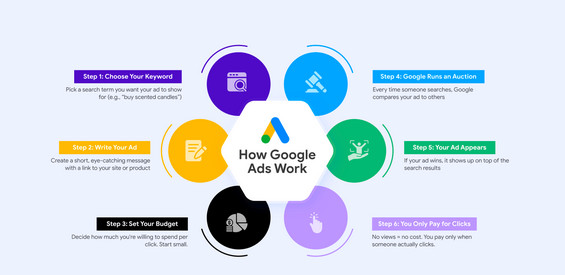
Google Ads operates on a pay-per-click (PPC) model, meaning you pay only when someone clicks your ad. Your ads appear on Google Search, YouTube, Gmail, and millions of partner websites.
Key Components to Know
-
Keywords — Search terms people type into Google.
-
Ad Auction — Google’s system that decides which ads appear and in what order.
-
Quality Score — A rating (1–10) that influences your cost and ad position.
-
Bid Amount — What you’re willing to pay per click.
-
Ad Rank — A combination of Quality Score and bid determining your position.
Understanding these basics helps you build stronger campaigns that cost less and perform better.
2. Define Your Advertising Goal
Before you create a campaign, Google asks for your main objective. This step is crucial because your whole campaign structure depends on it.
Common Google Ads Goals
-
Get website traffic
-
Increase leads and sign-ups
-
Boost sales
-
Grow phone calls for local business
-
Promote a mobile app
-
Increase store visits
Choosing the right goal ensures Google optimizes your campaign for the exact result you want.
3. Choose the Right Campaign Type
Google Ads offers several campaign types, but not all are suitable for every business.
1. Search Campaign
Your ads appear as text results at the top of Google Search. Ideal for:
-
Service providers
-
Ecommerce
-
Local businesses
-
Affiliate marketers
2. Display Campaign
Visual ads shown on websites across the Google Display Network. Best for:
-
Brand awareness
-
Retargeting
3. Shopping Campaign
Product-based ads with images and prices. Best for ecommerce stores.
4. Video Campaign
Ads shown on YouTube before and during videos. Ideal for:
-
Awareness
-
Product demos
-
Brand storytelling
5. Performance Max
Google automatically optimizes ads across all platforms. Good for:
-
Ecommerce stores
-
Advertisers wanting automation
6. App Campaign
Promotes mobile app downloads.
Choose the campaign type that aligns best with your goal.
4. Perform Keyword Research Thoroughly
Your entire Search Ads campaign depends on choosing the right keywords.
How to Find Good Keywords
-
Start with keywords closely related to your product/service.
-
Use long-tail keywords (3+ words) because they’re cheaper and more targeted.
-
Check keyword search volume, cost, and competition.
Types of Keywords
-
Transactional (buy, discount, hire) — best for conversions.
-
Commercial intent (best, top, review) — good for comparison shoppers.
-
Informational (how to, guide, tips) — useful for awareness.
Keyword Match Types
-
Exact Match → shows ads only for a very specific search term.
-
Phrase Match → shows ads for searches containing your keyword phrase.
-
Broad Match → shows ads for related searches, but can waste money if not monitored.
Use Exact and Phrase for best performance, especially as a beginner.
5. Create a Well-Structured Campaign & Ad Groups
Poor campaign structure leads to poor results. Organizing your ads properly improves Quality Score and reduces costs.
How to Structure Your Campaign
-
Create one campaign for each main service or product category.
-
Inside each campaign, create multiple ad groups based on keyword themes.
-
Each ad group should target a small group of closely related keywords.
For example, if you run a digital marketing agency:
-
Campaign: Google Ads Services
-
Ad Group 1: Google Ads Management
-
Ad Group 2: PPC Agency
-
Ad Group 3: Google Ads Expert
-
This helps your ads become more relevant and lowers CPC (cost per click).
6. Write High-Converting Google Ads
Your ad copy plays a major role in your click-through rate (CTR) and conversions.
What a Good Google Ad Includes
-
Strong headline using the target keyword
-
Unique selling proposition (USP)
-
Benefits instead of features
-
Clear call-to-action (CTA) such as Buy Now, Sign Up, Call Today
-
Emotional triggers like urgency or trust signals
Example Ad Copy
Headline: Best PPC Management Services – Increase Your Sales Fast
Description: Get expert Google Ads management to reduce ad spend and boost conversions. Free consultation available.
Writing multiple variations and A/B testing them helps you find the best performer.
7. Use Effective Ad Extensions
Ad extensions increase the visibility of your ad and improve your CTR at no extra cost.
Important Extensions to Use
-
Sitelink Extensions — extra links below your ad
-
Callout Extensions — short selling points
-
Structured Snippets — list features or services
-
Call Extensions — show your phone number
-
Location Extensions — show your business address
-
Price Extensions — display pricing
-
Promotion Extensions — show discount offers
Always activate as many extensions as possible for better results.
8. Set Your Bidding Strategy Correctly
Google offers different bidding methods depending on your goals.
Popular Bidding Strategies
-
Maximize Clicks — best for traffic
-
Maximize Conversions — best for leads or sales
-
Target CPA (Cost Per Acquisition) — ideal for controlling cost per lead/sale
-
Target ROAS (Return on Ad Spend) — perfect for ecommerce
-
Manual CPC — gives you full control but requires experience
Beginners should start with Maximize Conversions or Maximize Clicks, then switch to CPA or ROAS once enough data is collected.
9. Set Up Proper Targeting
Targeting helps you show ads to the right audience, reducing wasted budget.
Targeting Options to Use
-
Location targeting → city, region, or country
-
Language targeting → languages your audience speaks
-
Device targeting → mobile/desktop preferences
-
Audience targeting → in-market, affinity, and custom audiences
For local businesses, always target only your service area to avoid irrelevant clicks.
10. Optimize Your Landing Page for Higher Conversions
Even the best ads won’t work if your landing page is slow, confusing, or poorly designed.
Landing Page Optimization Tips
-
Use a clean and simple layout.
-
Place your main offer and CTA above the fold.
-
Use clear, benefit-focused headlines.
-
Add trust signals like reviews and testimonials.
-
Keep loading time under 2 seconds.
-
Use mobile-friendly design.
-
Remove unnecessary links that distract the user.
A high-performing landing page reduces your cost per conversion significantly.
11. Set Up Conversion Tracking (Very Important)
Without conversion tracking, you cannot measure your success.
Track the Following
-
Leads (form submissions)
-
Purchases
-
Phone calls
-
App installs
-
Add to carts
-
Newsletter sign-ups
Use Google Tag Manager or Google Analytics to create and monitor conversion events.
12. Start with a Test Budget
Instead of burning through your money, begin with a small budget to collect data.
Recommended Starter Budget
-
For local businesses: $5–$10/day
-
For national campaigns: $20–$50/day
-
For ecommerce: $30–$100/day
After your campaign starts running, wait for at least 7–14 days before making major adjustments.
13. Monitor, Analyze & Optimize Regularly
Successful Google Ads require ongoing optimization.
What to Monitor
-
CTR (Click-Through Rate)
-
CPC (Cost per Click)
-
Conversion Rate
-
Quality Score
-
Search Terms Report
-
Ad Position
-
Cost per Conversion
Key Optimization Steps
-
Pause irrelevant keywords.
-
Add negative keywords to block unwanted traffic.
-
Improve your ad copy.
-
Adjust bids.
-
Test new landing pages.
-
Check which keywords bring the most conversions.
Daily or weekly optimizations can reduce your costs significantly over time.
14. Use Negative Keywords to Save Money
Negative keywords prevent your ads from showing on irrelevant searches.
Examples
If your keyword is “digital marketing services”, you should add negative keywords like:
-
free
-
jobs
-
training
-
course
This ensures you attract high-quality traffic and avoid wasting money.
15. A/B Test Everything
Split testing helps you find the best-performing version of:
-
Headlines
-
Descriptions
-
Landing pages
-
Images (for display ads)
-
CTAs
-
Audience targeting
One small improvement can increase your conversions dramatically.
16. Leverage Retargeting for Maximum ROI
Retargeting shows ads to people who previously visited your website but didn’t convert.
Benefits of Retargeting
-
Higher conversion rate
-
Lower CPC
-
Better return on investment
-
Increased brand recall
Use remarketing lists, custom audiences, and customer match campaigns for better results.
17. Analyze Your Competitors
Competitor analysis helps you understand:
-
Their keywords
-
Their ad copy
-
Their offers
-
Their landing pages
This helps you craft better ads and unique selling propositions (USPs).
18. Scale Your Campaign the Right Way
Once your campaign becomes profitable, it’s time to scale.
Scaling Strategies
-
Increase your daily budget gradually (10–20% per week).
-
Add more relevant keywords.
-
Expand to new locations.
-
Use additional campaign types (Display, Video, Shopping).
-
Improve landing pages for higher conversion rates.
Scaling slowly ensures you don’t break your campaign performance.
19. Avoid Common Google Ads Mistakes
Many advertisers lose money due to avoidable errors.
Big Mistakes to Avoid
-
Using broad match keywords only
-
Ignoring negative keywords
-
Having poor landing pages
-
Setting the wrong bidding strategy
-
Not monitoring campaigns regularly
-
Targeting too wide an audience
-
Not using ad extensions
-
Writing weak ad copy
By avoiding these mistakes, you significantly increase your chances of success.
20. Final Tips for Running Google Ads Successfully
Here are quick success tips to boost your campaign performance:
-
Focus on user intent, not just keywords.
-
Keep your ads and landing pages consistent.
-
Always test multiple ad variations.
-
Use automation tools and smart bidding after collecting enough data.
-
Track everything—data is your biggest asset.
-
Optimize continuously to stay profitable.
Conclusion
Running Google Ads successfully is a skill that combines strategy, testing, optimization, and understanding your audience. With the right approach, Google Ads can deliver fast results, high-quality traffic, and consistent conversions.
By following this step-by-step guide, you’ll be able to launch well-structured campaigns, write compelling ads, choose the right keywords, reduce your ad spend, and scale your business profitably.